«Funda» is a gamification learning platform designed to make CS learning continuous like a game. It was a team project connecting roadmap-based learning, various quiz types, real-time battles, weekly rankings, and even AI learning assistance into one flow, and I led interaction-focused UI implementation across the frontend.
Since the core value of the project was 'enjoyable learning experience,' the frontend was not just about displaying data on the screen. It was closely linked to what users feel while solving problems, the sense of reward they get when they receive results, and the reason to return the next day.
Optimization of Blender–Three.js Runtime Connection
Funda's 3D character was the initial impression of the service and an interaction object responsible for emotional expression during learning. To move people's gaze, change facial expressions, and react to clicks, the character needed to have "presence" rather than just be "decoration."
Problem — Rigified Bone Structure
Rigified Bone was a structure that could not be controlled in real-time in a web environment. Using it as-is led to a situation where animation control itself was blocked. By debugging through five steps: analyzing the bone structure → weight mapping → animation transition validation → WebGL uniform tracking → final rendering inspection, we identified that trying to process data with high computational demand in web runtime was the structural cause.
Solution — Role Separation
다이어그램을 렌더링하는 중입니다...
Blender's Role — Pre-bake Static Data
Static animation data like idle and walk that repeat is pre-baked in Blender and included in GLB. This greatly reduced CPU load as there was no need to calculate bone matrices at runtime.
Three.js's Role — Only Real-time Interactions
Only interactions that need to react immediately to user input, such as gaze tracking (look-at), click reactions, lighting, and shadows, were handled at runtime. By separating character instances with SkeletonUtils.clone(), independent animation states were maintained on each screen.
Since characters are reused on various screens like guidance, celebration, and results, we distributed GPU load without rendering duplicate geometry using instancing techniques.
링크 정보를 불러오는 중...
Based on this structure, we also implemented an experience page where users can directly control the character’s animations and facial expressions (Shape Key) in real-time with a controller. This result allowed the character to serve dual roles as both a service branding element and a learning experience interface.
For more detailed reflections, you can see the article at 링크 정보를 불러오는 중....
Matching Quiz — Bringing Relationships Out of Your Head
Funda offers various quiz types such as multiple choice, OX, matching, and code analysis. Each type aims to deliver different learning objectives rather than merely listing formats. Multiple choice focuses on key concept identification, OX on correcting misconceptions, code analysis on inference of execution flow, and matching on understanding relationships among concepts.
| Multiple Choice (MCQ) | O/X Quiz |
|---|---|
| The most standard way to check concepts | Correcting commonly confused misconceptions (Anti-pattern) |
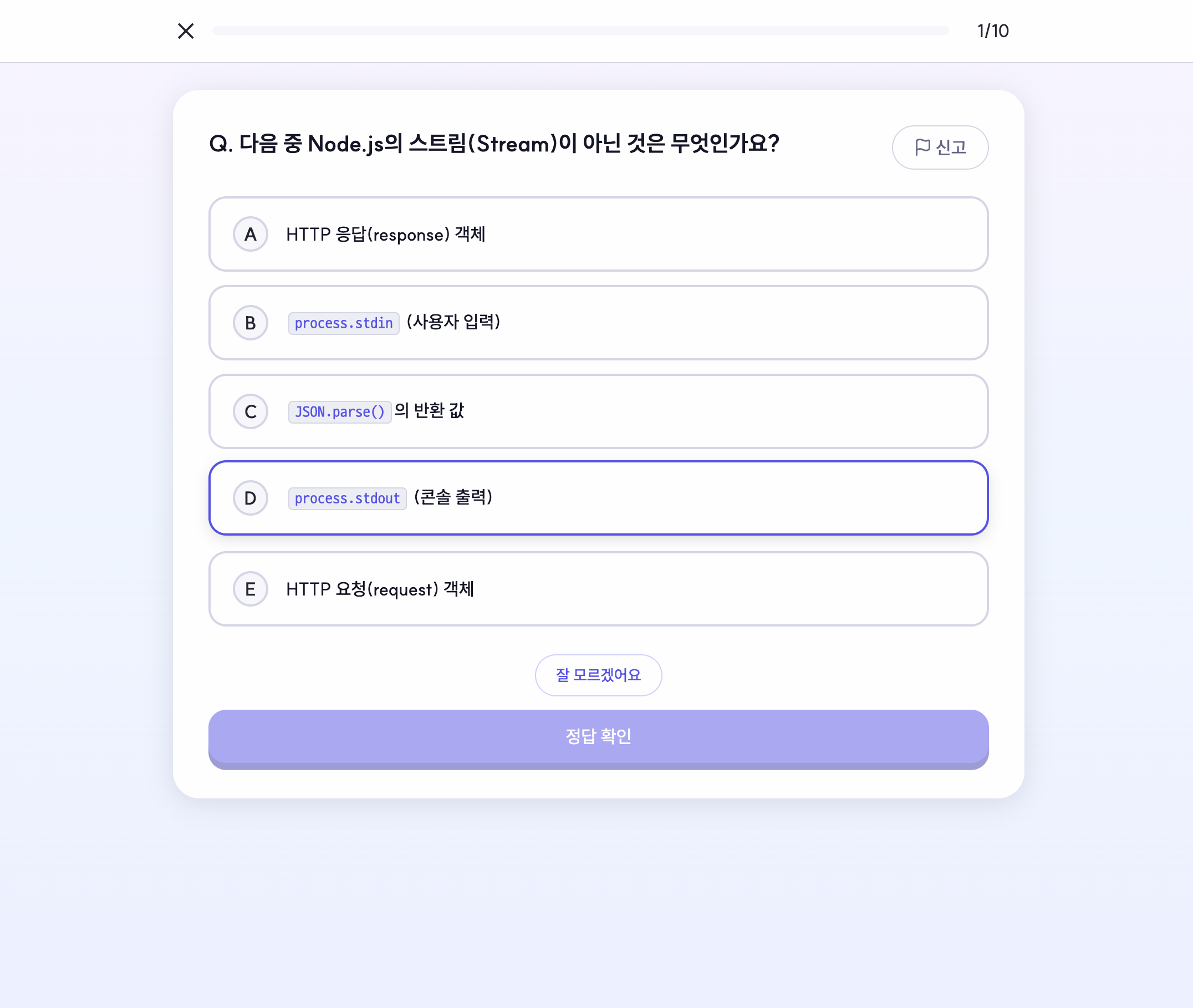 | 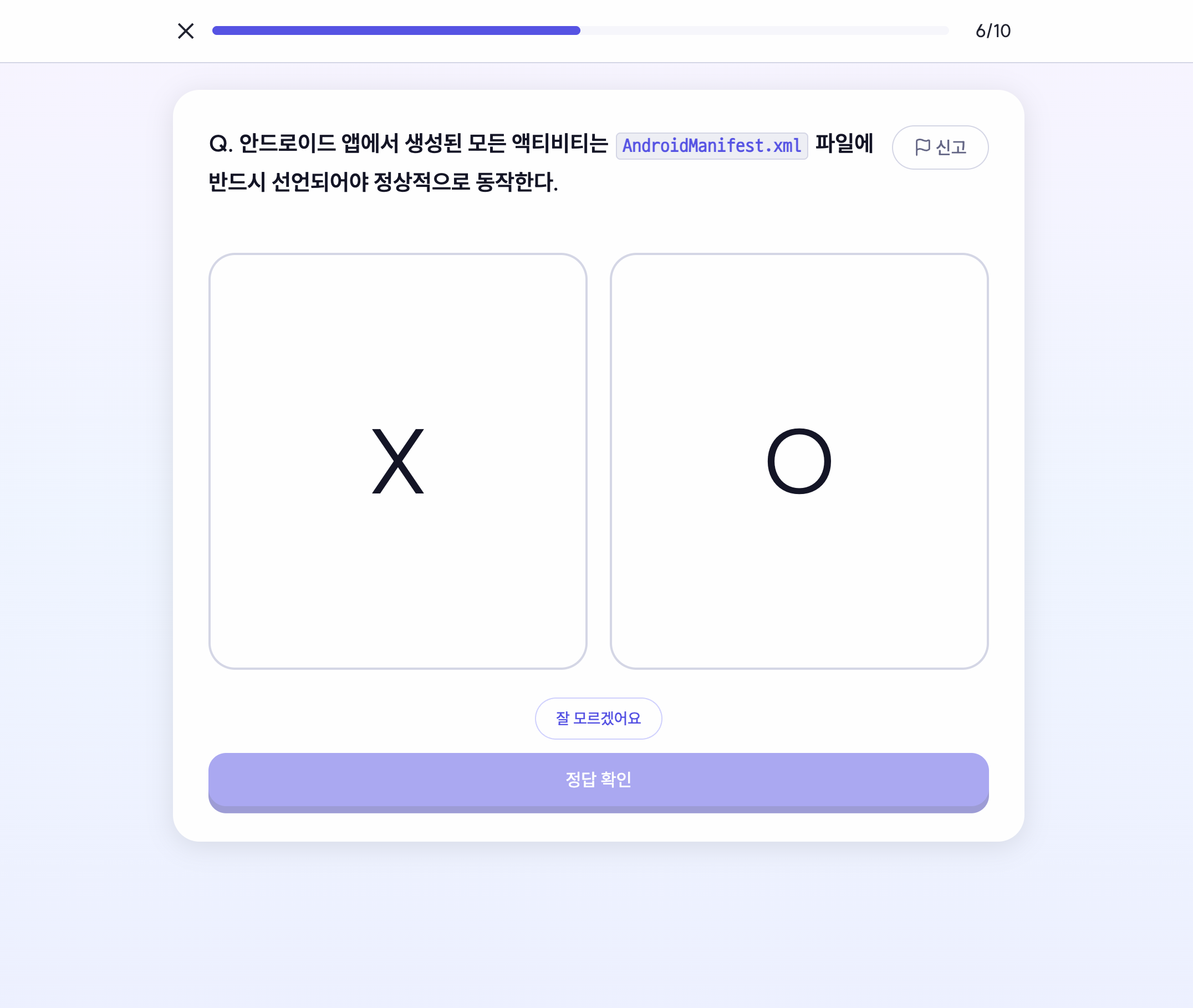 |
| Matching | Code Analysis |
|---|---|
| Connecting relationships between concepts and definitions or technologies | Inferring execution results and logic of actual code snippets |
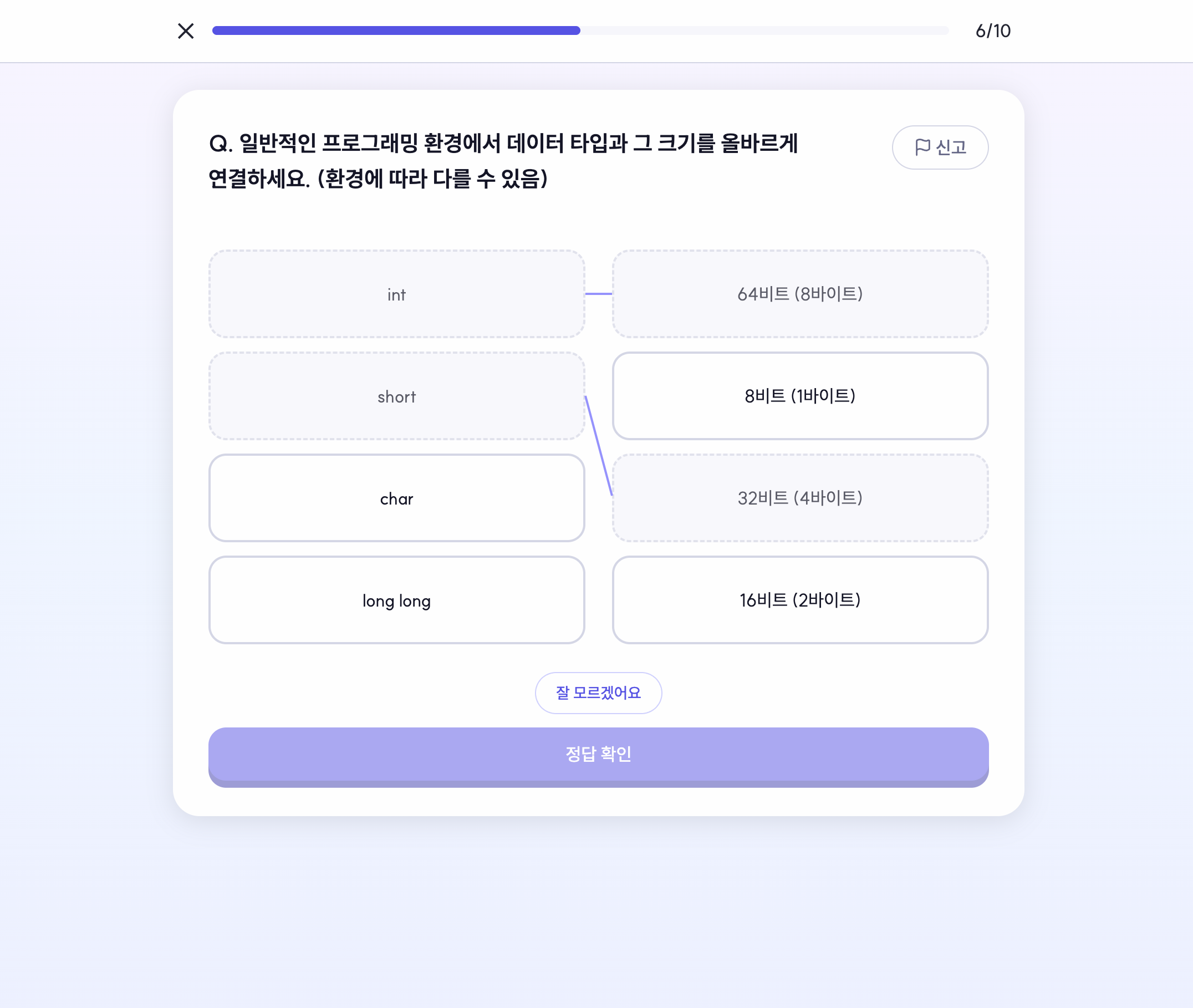 | 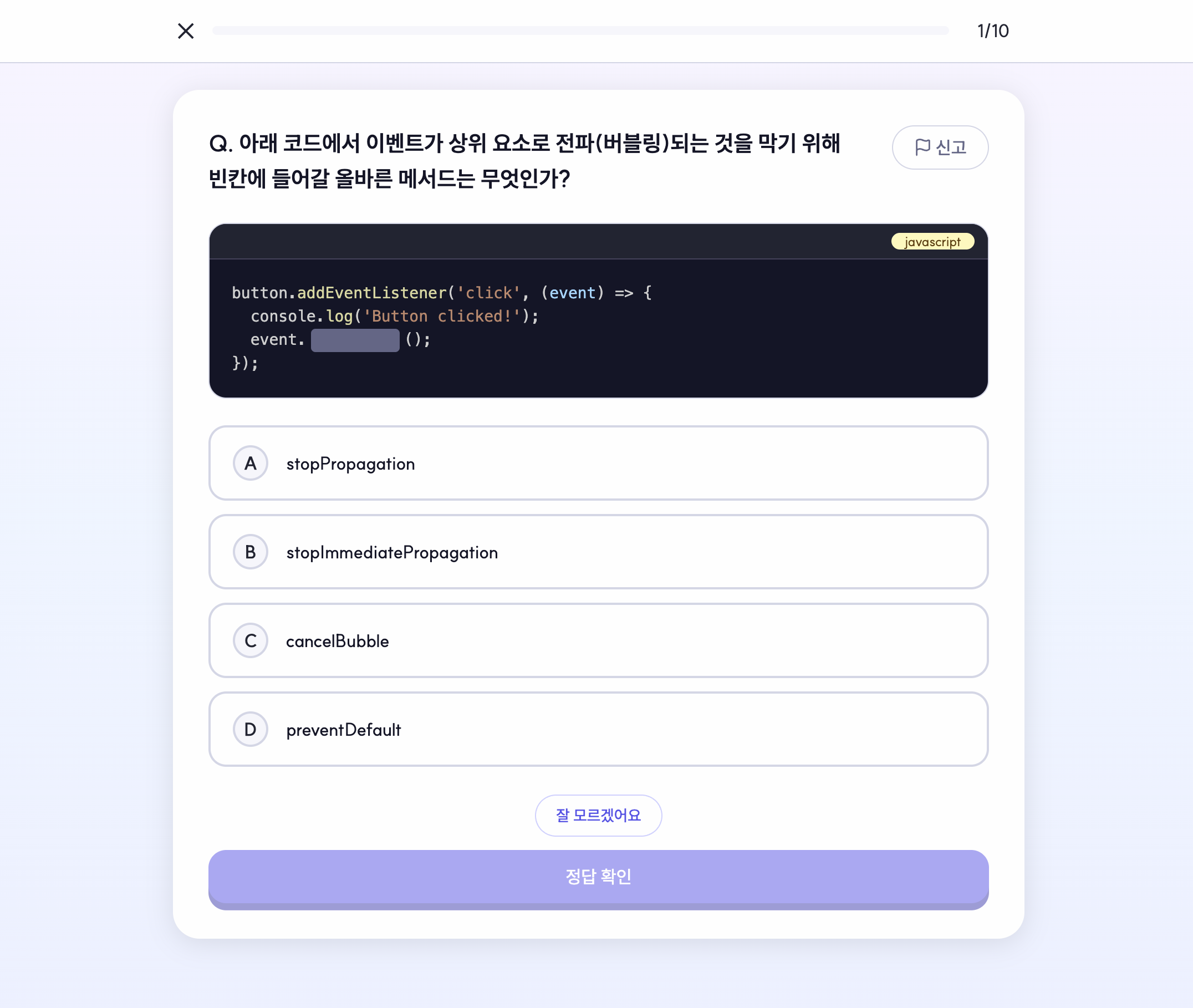 |
Among them, feedback repeatedly mentioned being unsure what to do in matching quizzes. If users maintained relationships only in their minds, cognitive load increased and learning flow was quickly disrupted.
Solution — Externalizing Relationships with SVG Connectors
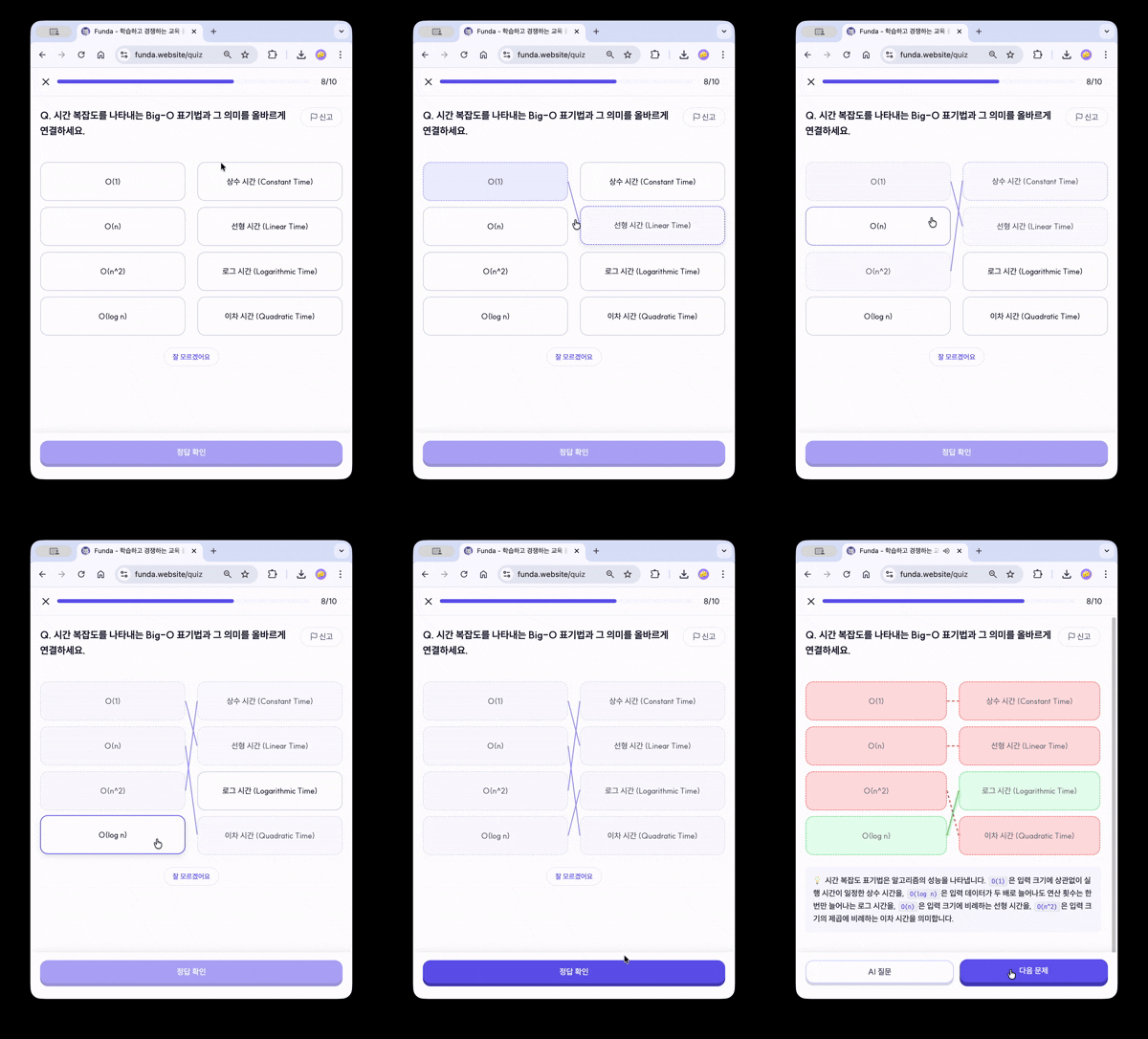
When both options are clicked, an SVG Path is dynamically generated to immediately visualize the connection state. With ResizeObserver, connections are recalculated when screen size changes, and after submitting answers, the correctness is instantly differentiated by the color and style of the lines.
plaintext
User Click → Update pairs state
           → Read DOM position (getBoundingClientRect)
           → Calculate SVG Path coordinates
After improvement, feedback on intuitiveness converged to zero, removing factors disrupting the core learning flow.
Quiz Results Screen — Designing a Sense of Reward
In an educational service, the results screen is not merely a summary table. It is a device that briefly conveys the feeling that « This learning session has been saved and yielded meaningful results ».
Different reward experiences were designed based on the situation.
 |  |  |
|---|
General Learning Complete — LESSON COMPLETE
XP, success rate, and time spent cards appear sequentially from the left. Framer Motion is used to time their appearance, and a ding sound played sequentially upon card appearance enhances the sense of reward.
First Attempt Reward — Streak
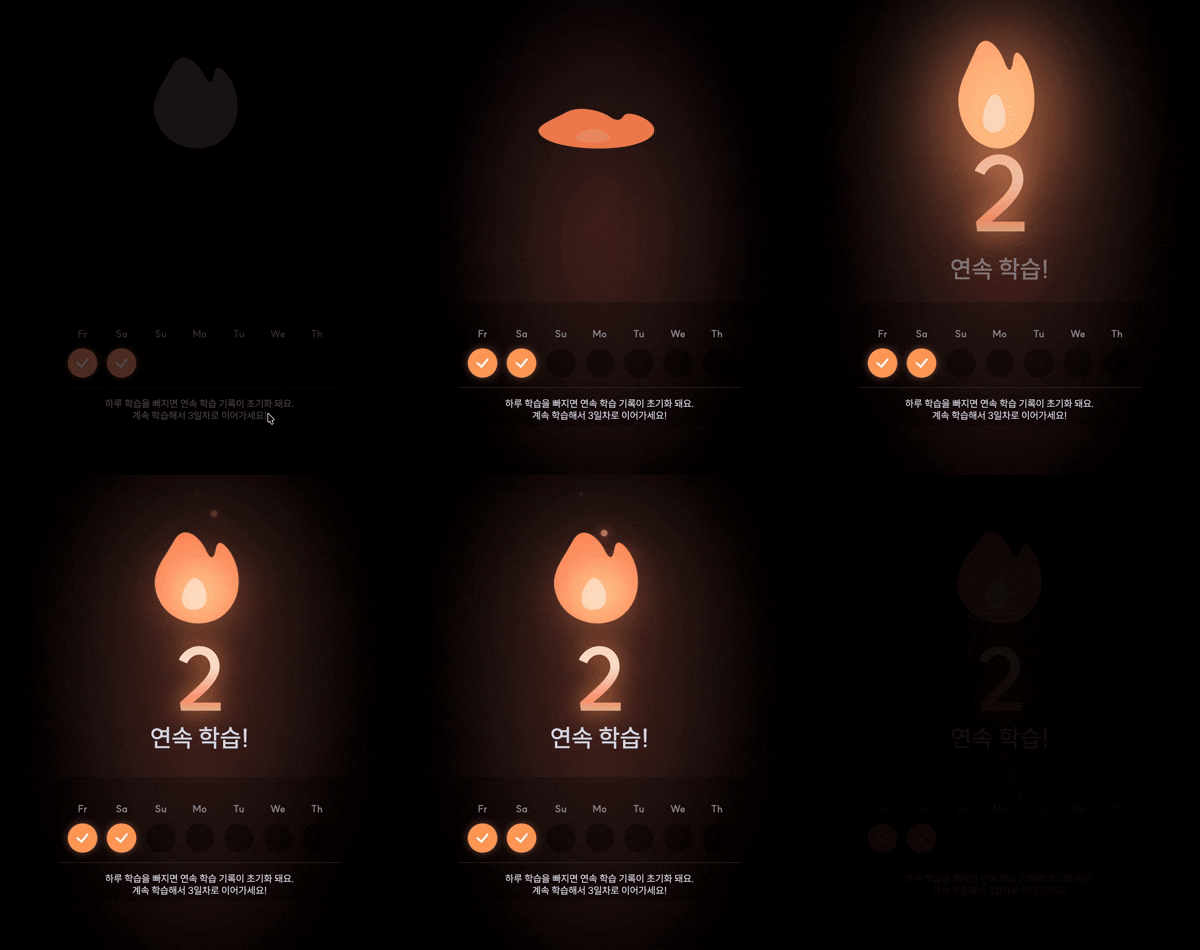
If it's the first attempt of the day, it branches to the Streak screen. Composed of large numbers, flame icons, weekly check status, and a prompt to induce learning the next day, it conveys the context of « continuing the learning streak ».
Review Complete — Special Effects
When finishing the last problem in review mode, it branches to a special effects screen instead of general results. After briefly showing a check badge, waves, and star particles, it returns to the learning screen.
plaintext
Because short and precise renditions were used only at moments of result, it didn't become distracting.
Real-time Battle — Separation of Socket Infrastructure and Domain Logic
| Battle Lobby | Problem Solving |
|---|---|
| Answer Verification | Result Screen |
|---|---|
Real-time battle was not merely about synchronizing scores. Different states such as lobby, invitation link, start countdown, real-time scores, and result disclosure needed to be reflected simultaneously in both routes and UI, and incorrect entries (no invitation token, room already started) had to be handled.
Hierarchical Structure Design
We designed a structure separating socket infrastructure from battle domain flow. To prevent real-time state changes from scattering across components, we divided it into 4 layers.
plaintext
Global state related to battles was separated with battleStore to reduce coupling between socket events and UI rendering. Even if battle rules change or state transitions are added, the clear responsibilities of each layer allow for predictable modification scopes.
다이어그램을 렌더링하는 중입니다...
Creating 6,000 Quiz Data in 30 Minutes with n8n + AI
A dataset of 6,000 quizzes was needed for service launch, but manual creation would take several days.
Pipeline Design
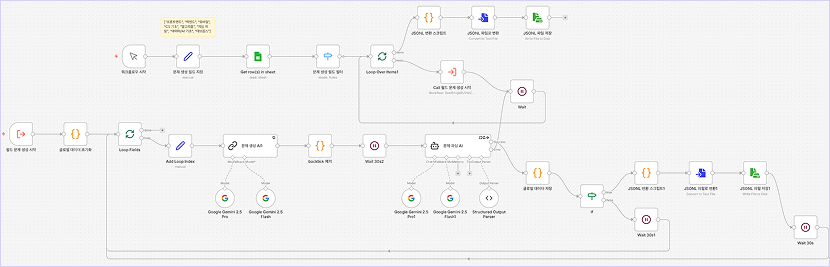
We designed an automation pipeline based on self-hosted n8n (Docker) + Google Sheets (Single Source of Truth) + Gemini. With parallel outputs of JSON/JSONL/CSV and a Docker parallel execution structure, we maximized processing speed.
Rate Limit and Parsing Errors
An increase in Gemini Rate Limit and schema parsing errors occurred with continuous LLM loop calls. We secured stability with batch interval delay logic and intermediate storage logic. By rotating 3 API keys, we tripled the throughput per minute and optimized processing time.
As a result, created 6,000 quizzes within 30 minutes, automating what would have been several days of manual work. It allowed the team to focus resources on core functionality development.
Routing Guard
Funda chose a structure that allows non-logged-in users to first experience learning and naturally transition to logging in when necessary. This entire flow was controlled on code-based routing.
By combining , , with and , we clearly delineated access paths based on login status and authority. The reason for specifying guards and loaders within route definitions is that as the service grows, access policies must be readable outside the UI code for maintenance.
plaintext
User Flow Design - Non-logged-in and Logged-in Integration
다이어그램을 렌더링하는 중입니다...
다이어그램을 렌더링하는 중입니다...
The reason for dividing browser storage and server temporary storage is due to their different roles.
Browser storage was a device to prevent the learning context from being interrupted even when the user was not logged in. By saving the last position viewed, the last completed unit for each field, and the progress of guest solutions, users can continue learning immediately after refreshing or returning. The advantage users perceive is the immediacy of not having to return from scratch.
In contrast, Redis was a layer intended to temporarily store step completion records and heart status on the server's basis even when there is no account. This allows data based on client_id to be merged into a user account the moment they log in, and values connected to service rules rather than simple UI states can be received on the server side. The advantage perceived by users is the continuity of progress accumulated during the trial not disappearing due to logging in.
In other words, the browser captures the context of the screen, and Redis captures the progress data just before account transition. It is similar to leaving composition and notes on a sketchbook and separately organizing materials needed for the main work on a studio table.
Email Notification and Subscription Cancellation Flow
 |  |  |
|---|
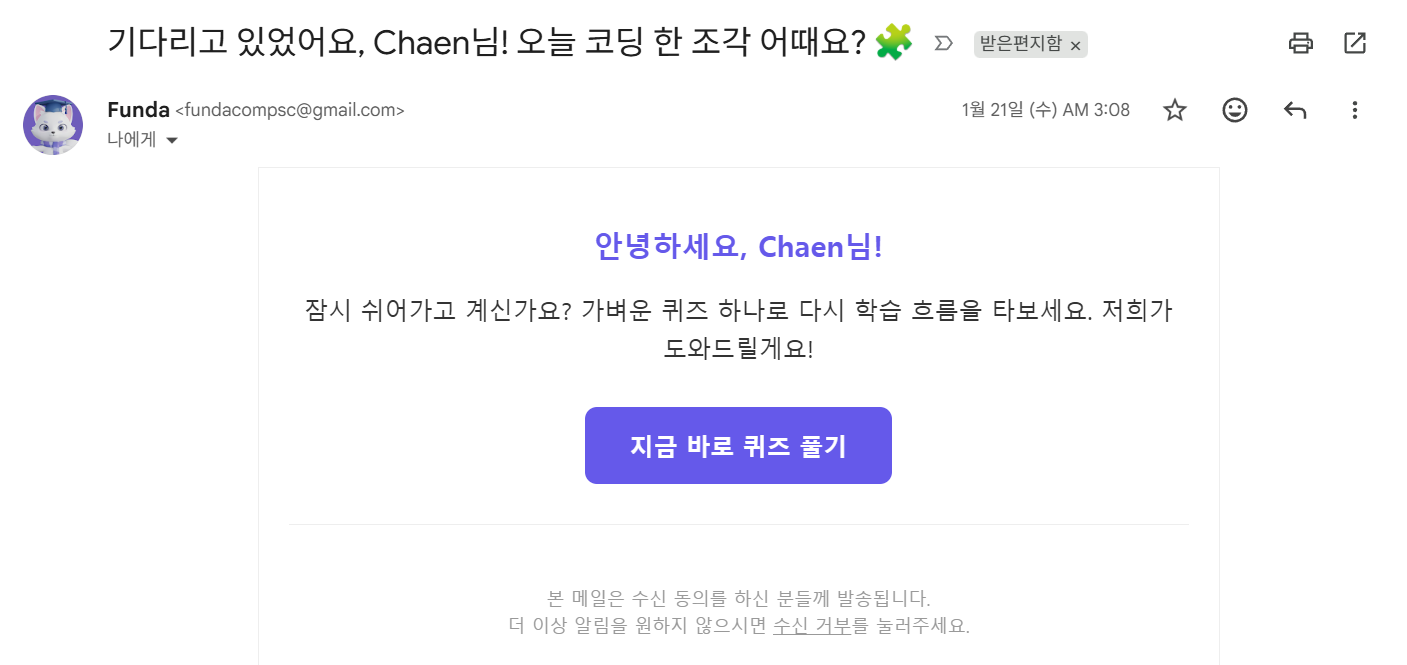
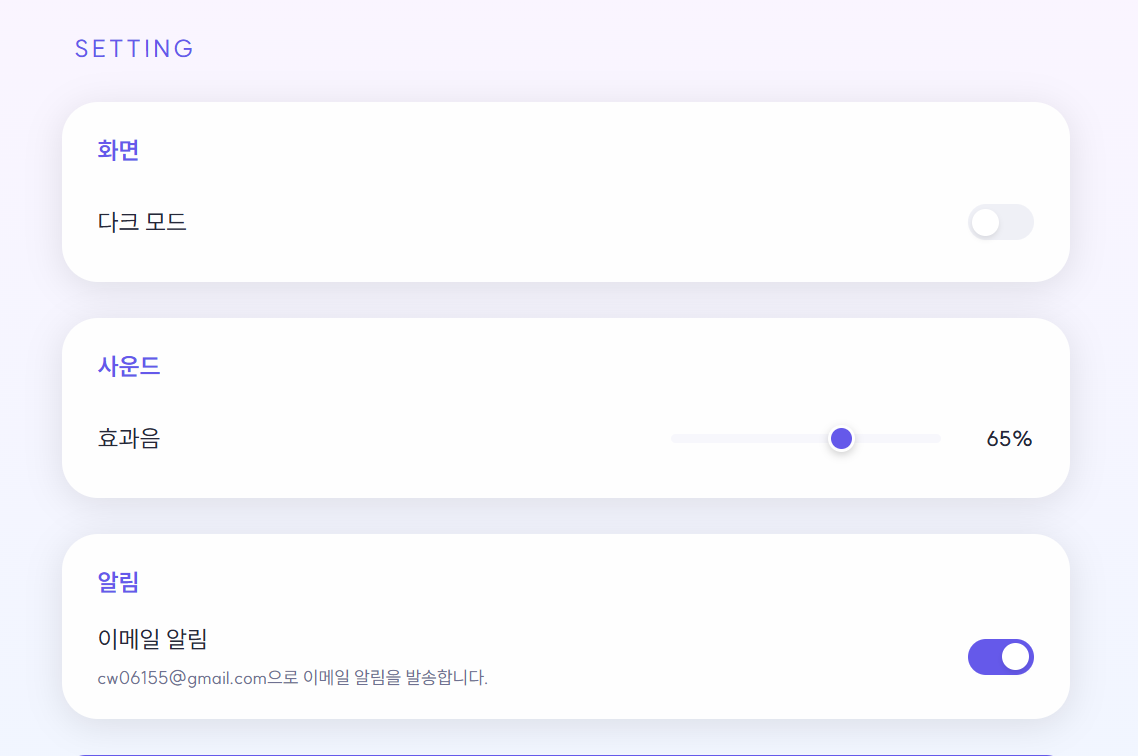
If the SM-2 based SRS calculates review timing, the regular learning notification email is a device that connects that timing to an actual action. It was completed as a single flow from the consent on the login screen → toggle on the settings screen → unsubscribe page in the email body.
Emails are filtered by queries with conditions such as '5 days after joining', 'streak break', 'login within last 14 days', '48 hours after last sent', so that they reach only when a nudge is needed.
To avoid the issue of hitting the Gmail SMTP server's per-second sending limit during mass mailing, a delay logic was added within the batch loop to control the sending speed to less than 5 per second at the application level. To escape the mechanical feel of a fixed format, open rates were increased by randomly combining the user's display name and diverse body text.
Finally, to prevent malicious third-party subscription cancellations through URL manipulation, a one-time JWT with a 7-day expiration was issued and included in the link, and brute force attacks were defended by limiting API calls to 5 per minute with @Throttle.
My Page — Motivation Through Learning Records
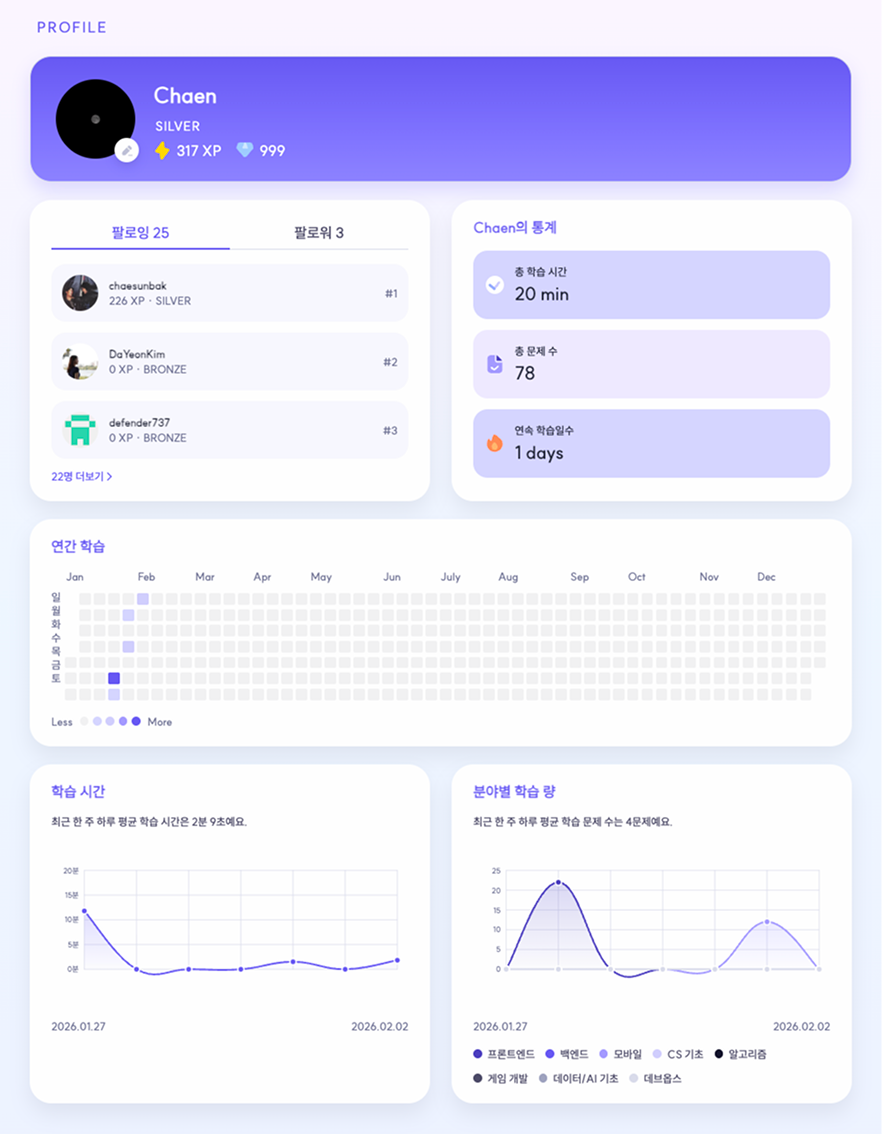
The profile page served not merely as a simple user information screen, but as a personal dashboard that re-translated quiz-solving records into learning motivation. It aimed to make it easy to grasp not only « how much was done » but also « when it was done » and « in which field » at a glance, with an annual lawn, a graph of learning time for the last 7 days, and a graph of problem-solving by field for the last 7 days.
Time Zone Handling
The learning records should be displayed on a daily basis, but if the server's date and the user's local date do not align, errors like « problems solved yesterday appear as solved today » immediately surface. By reading the user's time zone with and passing it to the server with the header, the date returned by the server is consistently linked to the lawn, tooltip, and axis labels with , , and .
ts
Lawn Heatmap
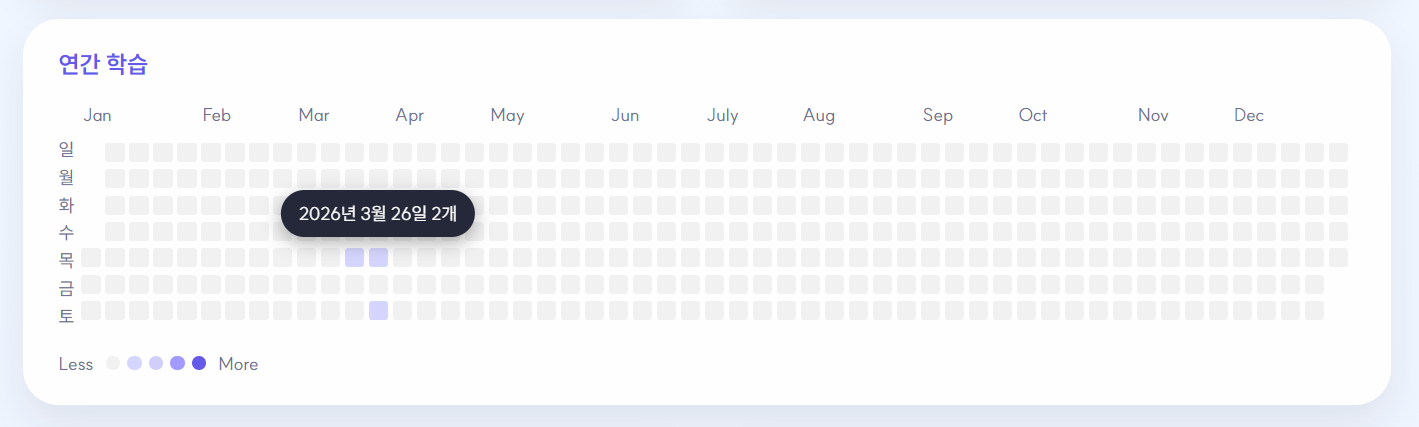
It was designed as a study heatmap including month labels, weekday labels, level-based color intensity, hover/focus tooltips, rather than a simple div grid. Cells without records do not respond to interaction, and only cells with actual records function like buttons, thereby maintaining high information density without excessive interaction.
ts
tsx
Direct SVG Chart Rendering
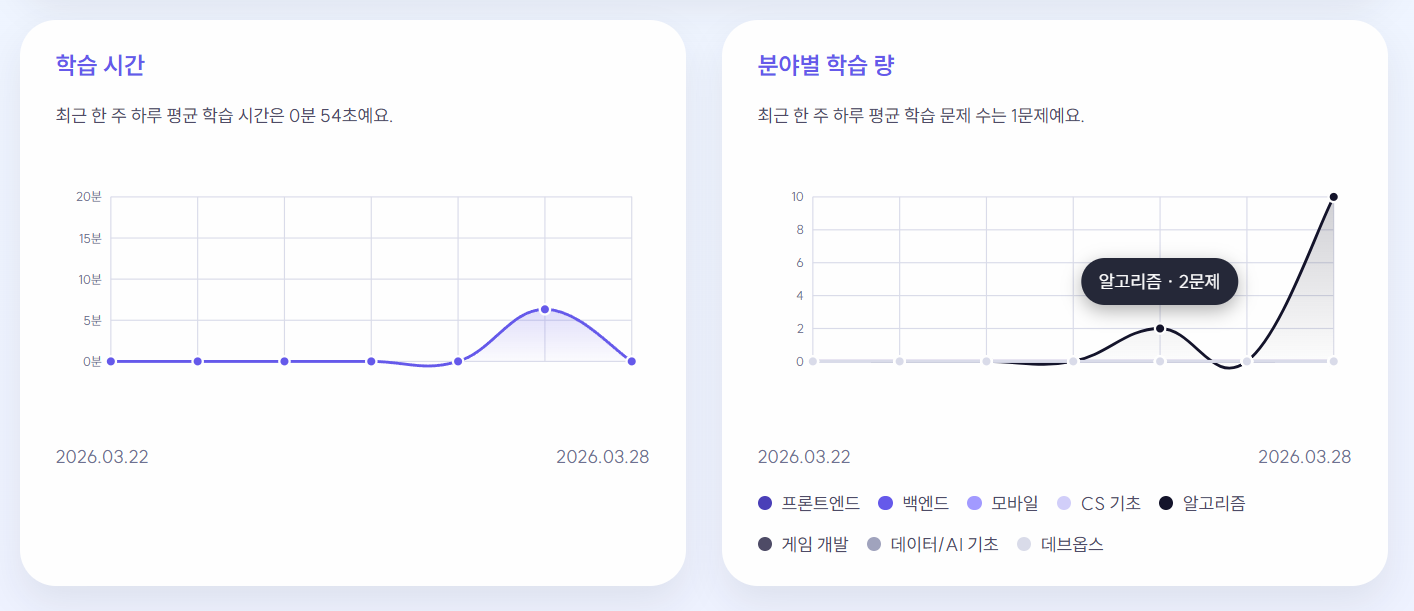
Both the learning time graph and the field-specific learning quantity graph were directly implemented with Y-axis ticks, grid lines, smooth curve paths, area gradient, hover points, and popovers on SVG. This allowed for more finely tuned control that matched the product's tone than a chart library.
ts
tsx
In Conclusion
Through Funda, I realized that interaction is not just a visual decoration, but a part of the design that keeps users engaged with the service.
While we dealt with visible implementations such as 3D characters, matching quizzes, and real-time battles, we also focused on why each interaction had to be that way and what problem it was designed to solve. I believe that good interaction doesn’t end with a flashy motion but lies in creating a flow that naturally guides users to understand the next action and encourages them to return.