When deciding to create a portfolio site, the first question I asked was «How should this site introduce me?»
I thought listing project names or drawing attention with a single interaction was not enough. From the first impression, to actual content exploration, resume download, interacting with visitors — create an experience connected as one flow.
Therefore, Chaen is a full-stack project that integrates a portfolio with a blog, project archive, resume distribution page, guestbook, and admin editor into a single product.

3D Hero Scene — Interaction as Entrance Design
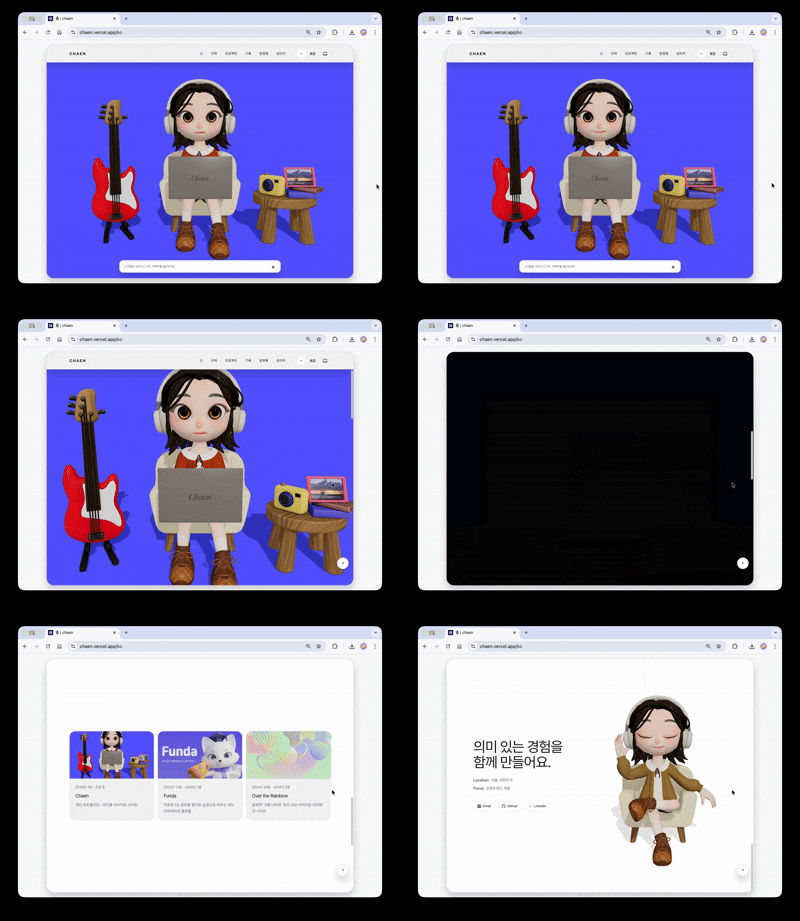
The goal of the first screen of the portfolio site was to seamlessly connect the 3D scene to the actual web content.
The hero scene features a character. It periodically triggers typing and notification response animations. Clicking the guitar on the left side of the screen plays different sounds by strings and a loop track, while clicking the camera on the right opens an image viewer and replaces the frame texture in the scene with the selected image. Each interaction is designed as an independent trigger–response structure, allowing the 3D scene to function as an interactive interface rather than just a background.
Scrolling down causes the camera to rotate 180 degrees, shifting the view to the character's laptop screen. As the laptop zooms in, the screen transitions to an actual HTML overlay and leads to a clickable project showcase.
plaintext
More than the naturalness of the presentation, interaction consistency at transition timing was more important. As the 3D scene fades out, the HTML UI should not be clickable. Therefore, the pointer-events of the Web UI layer were controlled with an opacity threshold to prevent incorrect interactions during transitions.
Why Choose R3F
For the 3D rendering library, instead of pure Three.js, I chose React Three Fiber (R3F).
This project is based on Next.js + React, and with pure Three.js, you have to manage everything from initializing the Scene, Camera, and Renderer, to animation loops and resize handling. R3F abstracts this boilerplate into a React component model, allowing cameras, lights, and objects to be declared in JSX, and naturally handling synchronization between React states outside the Canvas and the 3D scene. This choice was particularly effective in a structure where scroll progress, UI layer states, and the 3D scene are closely connected.
3D Asset Pipeline — From Blender to the Web
When I first implemented a 3D character in Funda, I directly experienced the limitations of the Rigified Bone runtime structure. That experience taught me that performance issues should be addressed from the asset design stage, not the runtime stage. Although Funda resolved this by baking animation data in Blender beforehand to reduce runtime bone matrix calculations, optimizations at the geometry/render pipeline level, such as texture memory, Draw Call, and vertex count, needed separately addressing.
Chaen's 3D assets were designed from the start with this perspective. The runtime (R3F/Three.js) only handles interaction, while costs are pre-reduced at the Blender stage.
다이어그램을 렌더링하는 중입니다...
Vertex Optimization — Ensuring Highpoly Quality Without Subdivision Apply
Problem: The intuitive way to make a mesh smoother is to apply a Subdivision Surface. However, Apply quadruples the face count at each level, becoming a direct rendering cost in web environments.
Solution: Recalculated the normal direction using the Weighted Normal modifier without Subdivision Apply. The face count remains the same, but the normal used in lighting calculation interpolates smoothly like highpoly. Specific edge normal direction shifts occur depending on the mesh structure, so face unit normal weight was adjusted directly to obtain the desired quality without breaking.
Texture Atlas — Minimizing Draw Call
Problem: In Three.js, objects with different materials cannot be drawn in one go. Using separate materials for each part results in Draw Calls occurring for each part.
Solution: Group related parts by purpose, rearrange their UV to fit atlas coordinates, and change them to refer to a shared, integrated atlas texture. Objects sharing the same material are grouped into one Draw Call.
ORM Packing — Combining 3 Textures into 1
Problem: In the PBR workflow, Occlusion, Roughness, and Metalness each require separate textures. Three textures mean triple GPU memory and network bandwidth.
Solution: As all three channels are grayscale data (0–1 scalar value), pack them into R · G · B channels of a single image. This reduces 3 textures to 1, simultaneously reducing GPU memory and initial loading transmission.
Instancing — Removing Redundant Calculations for the Same Geometry
When the same geometry is used in multiple places, the instancing technique uploads it to the GPU only once, removing redundant calculations.
Responsive Scene Mode
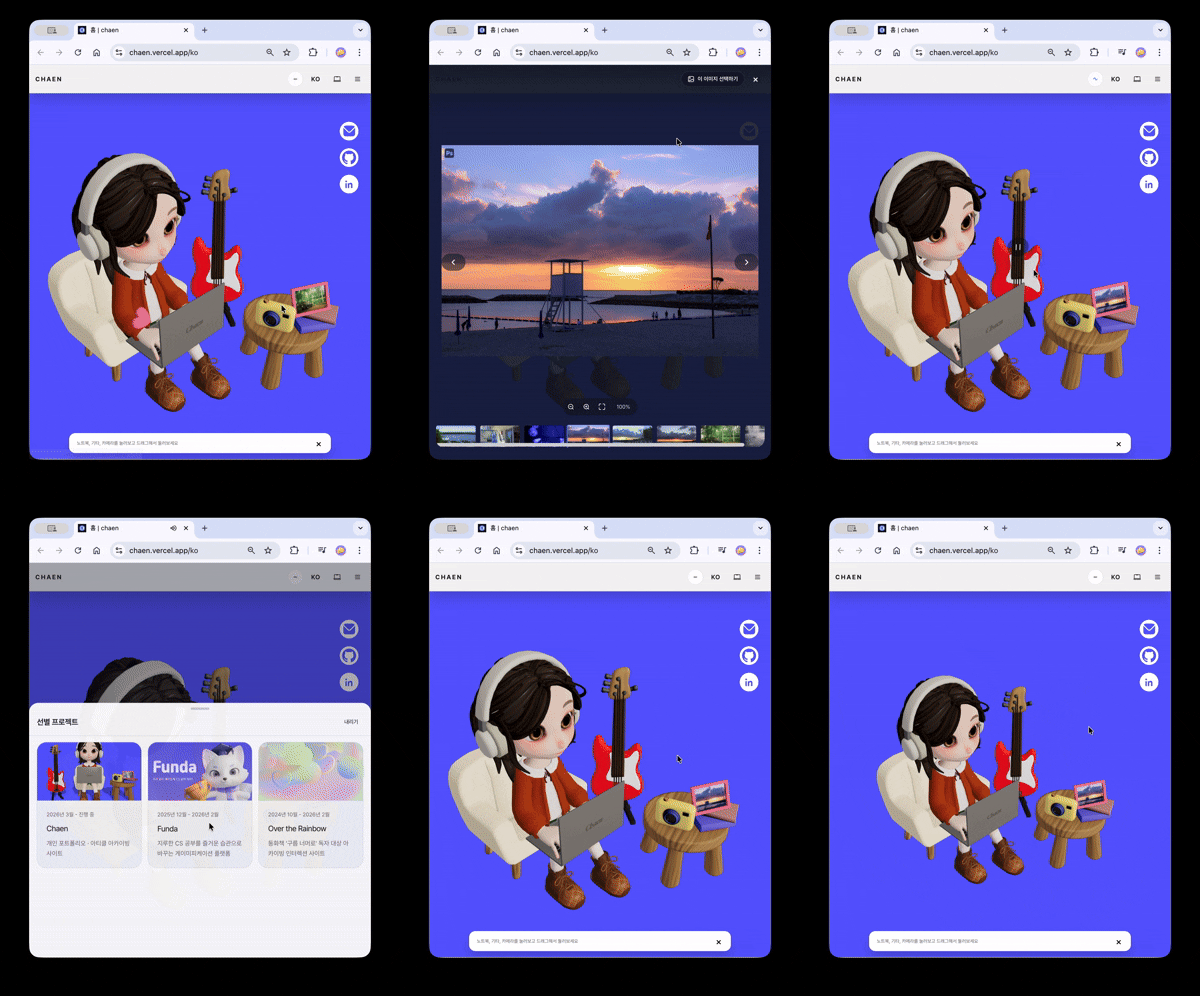
The 3D scene branches into stacked (vertical ratio dominant) / wide (horizontal ratio dominant) modes based on the viewport aspect ratio.
- stacked: Interaction focused on tap and drag. Reduces rendering cost with a conservative DPR cap, like in the contact scene.
- wide: Maintains the scroll-based camera transition experience. Leaves only the necessary quality.
Simplified rules ensure branching into one of the two modes without intermediate states. For users with prefers-reduced-motion, strong camera movements are omitted to provide a short and concise entry experience, and a safe fallback without 3D is shown in non-WebGL environments.
Multilingual and SEO — Beyond Visibility
Chaen supports ko / en / ja / fr in 4 languages. In a multilingual site, the important factor is not just having multiple translated strings, but a structure that does not break user experience and search visibility simultaneously due to missing translations or path splits.
Content Data Model
The content is designed with a structure of . , , keep common slugs as identifiers, while actual titles and bodies are managed per locale in separate tables like . When a request comes in, the most appropriate translation is selected in the order of target locale → → → → .
While keeping URLs and content references stable, only titles, descriptions, and labels shown on the screen are selected from the translation pool.
Translation Pipeline — n8n Automation
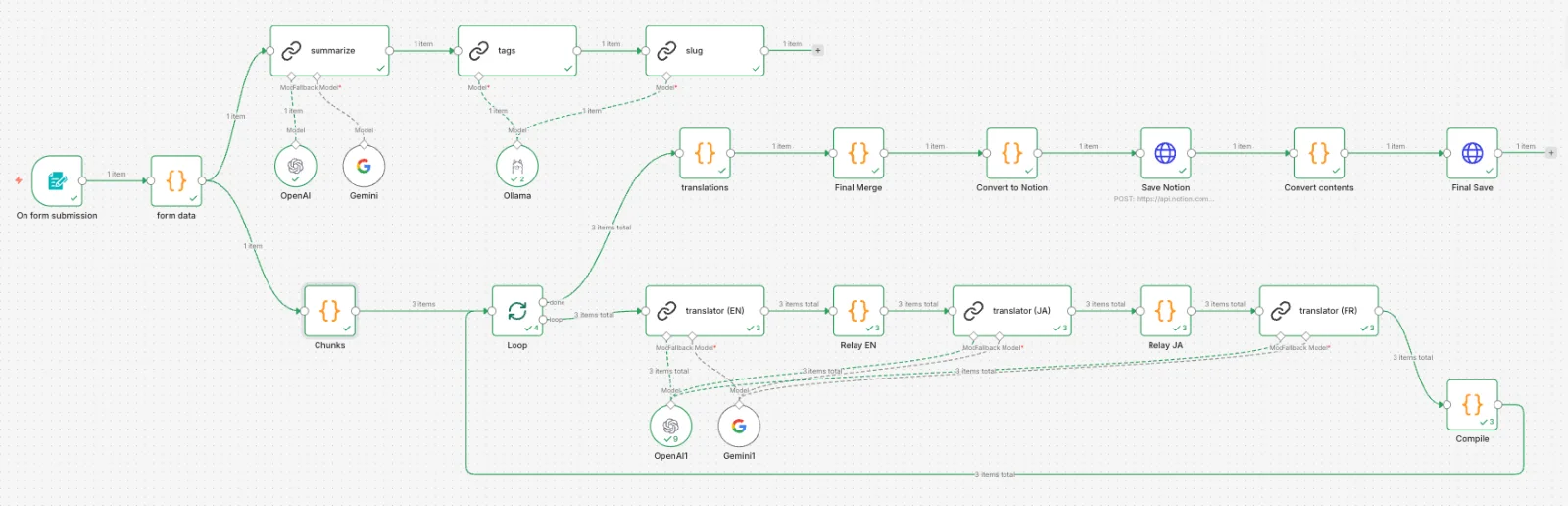
Even if the content data model is separated into article_translations, if the translation itself becomes a bottleneck, maintaining multilingual support becomes difficult. If the process of translating, reviewing, and storing an article in 3 languages is done manually each time, publishing the article itself becomes a burden.
To solve this problem, a translation automation pipeline based on n8n was configured. By entering title, description, and body Markdown into a form, tag extraction, slug generation, EN/JA/FR translation, and Notion storage are processed at once.
plaintext
Some Design Decisions:
Summary First
- When putting the entire body directly into a tag/slug LLM, it can sometimes return the body instead of a summary. By first creating a 2-3 sentence summary, it is separated for reference in tag and slug generation.
Separate Models by Role
Tasks where quality is important, such as translation and summary, are done by OpenAI, while tasks aimed at short structured output like tags and slugs are done by local Ollama. This reduces API costs while maintaining quality.
Chunk-Wise Translation
When requesting translation for a long article as a whole, intermediate content may be omitted or Markdown structure may break. It is divided by H2 headings and processed sequentially. The translation results for each chunk are accumulated at the relay node and passed to the next language, and the whole is merged after the loop completion.
Structured Output
Translation results are received in JSON format { title, description, content } and are separated and stored as Notion properties (metadata) and page body (blocks). The body is divided into batches and PATCH requests are made to fit the 100-block limit of the Notion API.
Invisible Locale Assets
Not only text visible on the screen but also aria-label, placeholders, error messages, and screen reader status texts are all managed as locale assets. If only the body is translated and instructional texts remain in another language, the experience fragments quickly. This ensures that the user's "viewing language" and the auxiliary device's "reading language" are not separated.
SEO Infrastructure
Automatic canonical·hreflang
At the generateMetadata stage of each page, automatic calculation for locale-specific canonicals and hreflang alternates was organized. If a translation is missing, it reduces the possibility of duplicate content by indicating the fallback locale as canonical, while still providing fallback content to users.
JSON-LD Structured Data
BlogPosting schema is injected for article details, CreativeWork for project details, and BreadcrumbList for common breadcrumbs. This allows search engines to clearly interpret the document type, title, publication timing, and page hierarchy beyond HTML parsing.
Dynamic Sitemap/Robots
Instead of static XML files, sitemap and robots are generated in code based on the Next.js Metadata API. Reflecting Supabase data and actual URL structure directly, sitemaps automatically stay up-to-date as locales increase or data changes. Paths for administrators, callbacks, and guestbooks are explicitly blocked with noindex, nofollow.
Improving Detail Page Entry Speed — 5 Seconds → Within 1 Second
There were instances when the perceived waiting time when moving from a list to an article detail was approximately 5 seconds. The issue was a structure where users waited for the left archive list, tag labels, related articles, and multilingual locale fallback processing to all be ready with the same priority. It wasn't that individual fetches were slow, but nothing was visible until all the serialized layers were completed.
Prioritizing Streaming of Main Content — Separating Render Timing
I separated the essential data for the main shell from auxiliary data that could arrive later. The archive list, tags, and related articles start a Promise without await, and are delivered via section-level Suspense fallback. The main content appears first, and auxiliary sections are loaded subsequently through a Skeleton.
다이어그램을 렌더링하는 중입니다...
Unifying Cache Structure
The overlap of page-level ISR (revalidate = 3600) and entity-level unstable_cache made identifying stale causes complex. I removed page ISR and left only entity cache + explicit invalidation with after write. As the cache layer became singular, I could track the cause of stale from one place.
The cache hit status is measured directly through server logs. Since the unstable_cache function body is executed only on cache miss, placing a [cache-miss:article] log inside reveals whether a DB query occurs.
plaintext
[cache-miss:article] slug="fe-performance" locale="ko"   ← Only outputs on cache miss
[perf:article] slug="fe-performance" locale="ko" ms=4    ← Always outputs (hit: <5ms)
[perf:article] slug="fe-performance" locale="ko" ms=340  ← Exposes query cost on miss
Separating Cache Responsibility for Comments and Main Content
Comments have completely different freshness requirements compared to the main content. I separated comments into a browser session scope memory cache (TTL 60 seconds) to prevent blocking entry to the main content. Immediately after writing, editing, or deleting a comment, all cache entries of the relevant article are deleted to prevent stale data reuse.
Improving Infinite Scroll Request Structure
The infinite scroll "Next Page Query" was using POST-based Server Action. It was a structure where pure read requests took mutation transport. I switched to GET /api/articles?cursor=... Route Handler and added Cache-Control: s-maxage=60, stale-while-revalidate=300. Actual data freshness is determined by the entity cache, and the transport behaves like a read resource.
Results
The perceived speed reduced from approximately 5 seconds to 0.5~1 second. More significant than the numbers was the disappearance of the "feeling that the surroundings are attached late," with the main content appearing reliably first.
This structure could be progressively organized because the responsibilities of route, view, entity, and feature were divided from an FSD perspective. I could proceed by separating the layers creating bottlenecks one by one.
4. Offset → Keyset Cursor Pagination and Navigation UX
As content grows, list navigation becomes not just a rendering issue but an information architecture problem. The traditional Offset method had two issues: performance degradation to O(N) as the DB must read and discard all prior data as pages go further back, and duplicate exposure causing the feed to jump when new posts arrive while a user is scrolling.
Cursor Structure Design
I implemented absolute coordinate-based pagination by serializing a 'publish_at + id' combination into an opaque cursor. As it queries based on the fixed criterion of « before a certain point in time », feed flow is not disrupted by real-time updates of posts, and by traversing indexes, only necessary data is retrieved, maintaining O(log N) performance regardless of data size.
다이어그램을 렌더링하는 중입니다...
Extending Keyset to Search — PostgreSQL FTS + Rank Cursor
The same cursor structure was extended to search results. When there is a search term, a 3-tier sorting coordinate of relevance (rank) + publish_at + id is serialized into a cursor, maintaining sorted relevance while preventing overlaps/losses at page boundaries.
Search performance is optimized by pre-calculating a tsvector column with a DB trigger to leverage a GIN index. Instead of using the CPU for every search request, the fingerprints are created in advance during data creation/modification. Differential scoring is applied to titles (weight A) and descriptions (weight B) to improve search accuracy.
다이어그램을 렌더링하는 중입니다...
Connecting SEO and Navigation UX
Since cursor-based URLs include state, leaving them as-is negatively impacts search indexing. Applying noindex, follow and Canonical tags to cursor URLs prevents duplicate indexing by crawlers, while simultaneously generating rel="prev" / metadata, maintaining a structure that allows bots to follow static page links.
Handling abnormal deep-links
Keyset cannot restore the target location with just a page number. Manual deep-links of the form ?page=N entering without a cursor are handled with notFound(), removing server costs of serially restoring mid-pages.
Detailed Archive Adjustment
The detailed archive on the left of a detailed page includes the currently viewed item in the list to prevent the user from losing the list context. At this point, nextCursor is recalculated based on the final rendered item to ensure the next page follows without omission.
Automatic Load Gate
To prevent unintended additional requests simply because the sentinel initially appears in the viewport, automatic load operates only after the user shows actual scroll intent.
다이어그램을 렌더링하는 중입니다...
5. Accessibility and Interaction Quality
The more interactions a site has, the more likely the quality of accessibility collapses due to small accumulative errors. I addressed accessibility not just as a checklist at the end, but as a quality standard raised alongside interaction design.
Modal·Popover Focus Trap
I created a common hook that manages moving to the first focus element upon entry, Tab cycling, closing on Escape, and returning to the previous focus when closed. Instead of handling each component individually, I gathered them in a common layer to ensure a consistent focus flow even as interactions increase.
State Communication
The search form applied , , and state text to convey status that isn't visually apparent. , , and focus-visible styles were consistently applied to spoilers, tag filters, pagination, and action menus.
Icons and Locale Assets
I created a common icon wrapper that differentiates between and based on whether the icon is decorative or conveys meaning. Phrases for screen readers linked to , , and , along with keyboard shortcut hints and input validation messages, are all managed per locale. This ensures that the "language seen by users" and the "language read by assistive devices" are not separated.
Conclusion
Chaen is a project that goes beyond a personal portfolio, showcasing how I design frontend products with specific criteria.
I enjoy interactions, but I don't want to explain the project solely through interactions. Good interaction becomes a product experience when it is designed in conjunction with performance, accessibility, information architecture, search-friendliness, and operability. Chaen is the work that encapsulates this perspective most intensively.